Dell STREAK, A Decent tablet

A Decent tablet, Great in the looks and hardware department..

ASUS - Eee Pad

An Android tablet from Asus for Next Gen Computing..

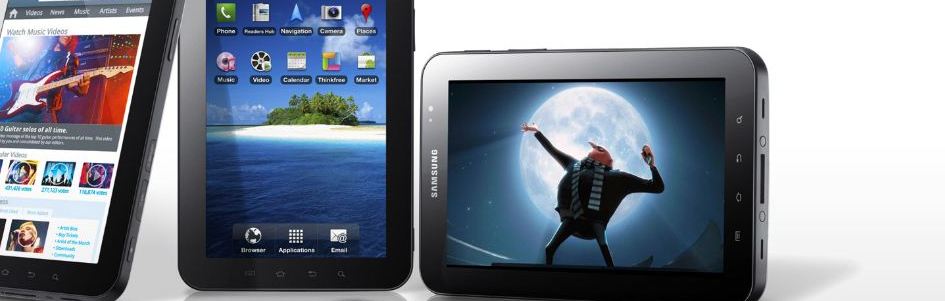
SAMSUNG Galaxy Tab

It's Time for A better Tablet, So Choose Galaxy tab..

Nokia N900

The Nokia N900 with Linux-based Maemo software takes us into a new era of mobile computing..

Performance Perfected: Introducing the GeForce GTX 690

GeForce GTX 680 launched last month, reviewers praised not only its record-setting performance, but also its incredible power efficiency..

Translate

Showing posts with label Test Centre. Show all posts

Friday, June 1, 2012

Toshiba Qosmio X500


"GOOD MULTIMEDAIA PERFORMER, BUT A TAD PRICEY."


ForLarge screen, good speakers, good looks, Blu-ray writer.


Against: A bit expensive, flimsy build quality, GPU is a bit
dated, no USB 3.0.


Toshiba have gone with a bold and snazzy look for the X500. The bright red LED lighting gives it a very attractive look. The chassis is made up mostly of plastic, which isn’t very strong. There’s quite a bit of flex in the lid, which should not have been. Also, most areas have a glossy finish, so fingerprints and dirt are a nightmare. The hinge seems sturdy enough, allowing the screen to tilt back 160 degrees. At 4.75 kgs, you can’t even think of lugging this around as it’s too heavy. This is the first gaming notebook we’ve come across that sports a 18.4-inch full HD screen, which is simply gorgeous. 
                    There are four USB 2.0 ports in all (one ESATA combo) with sleep and charge function; no USB 3.0 ports though. Other features include HDMI, FireWire, Blu-ray writer, Express card slot, headphone and microphone jack and a VGA port. One thing we noticed was that the fit and finish of the chassis wasn’t very good. There were plenty of gaps around the optical drive and the ports didn’t fit well in the cut-outs of the frame. Overall, the build and finish wasn’t up to the mark; certainly not something you’d expect from a high-end gaming notebook. 
There are four USB 2.0 ports in all (one ESATA combo),
but no USB 3.0 ports.
SPECIFICATIONS
Dimensions (W x D x H): 44.2 x 29.4 x 4.6 cm; Weight:
4.75 kg; Processor: Intel Core i7-2630QM2.0 GHz;
RAM: 4 GB; Hard Disk: 750 GB; Optical Drive: Blu-Ray
writer; Display: 18.4 in, 1920x1080; GPU: GTX 460M;
Connectivity: 802.11b/g/n, Ethernet, HDMI, USB 2.0,
eSATA, FireWire; OS: Windows 7 Home Premium
                    The Harman Kardon speakers have large drivers, which can clearly be seen through the grill. A bunch of touch sensitive media keys are placed on the left, which is really annoying since you accidently hit them every time you start to type. The X500 is powered by the latest Intel Core i7-2630QM, which runs at a stock speed of 2.0 GHz, and can Turbo up to 2.9 GHz. Additionally, there’s 4 GB of RAM, a 750 GB hard drive and a Nvidia GTX 460M graphics card. The X500 is pretty well-equipped for a gaming notebook other than the fact that the graphics card is slightly old. While the CPU performance is solid in most benchmarks, the graphics card shows its age in the gaming tests.The X500 runs relatively cool and quiet even when stressed. The backlighting of the keyboard is even, but the keys themselves could have been designed better. The shortcut keys on the left could have been placed elsewhere as they always get in the way. They make an annoyingly loud beep every time you press them and there’s no way to disable that. 
                    The Harman Kardon speakers are one of the best in a notebook. The soundstage is wide and they are able to reproduce clear highs and mids. The low end is notvery pronounced, but then again we don’t really expect it to be. The X500 is fitted with a 12-cell Li-ion battery which lasted only 1 hour 20 mins on Battery Eater Pro, which is average.Toshiba has priced it at Rs 1,00,990, which is not bad considering the large screen and great speakers. There are some minor niggles, like the average build quality, annoying shortcut buttons, and the outdated graphics card, which makes this price tag seem rather high.


Friday, May 25, 2012

DELL STREAK


Great in the looks and hardware department, but lacks in performance and features."


DELL STREAK
VERDICT: Great in the looks and hardware department,
but lacks in performance and features.
FOR: Good looking device, camera image quality is
good, decent music player.
AGAINST: On-screen keypad could have been better,
volume on calls is low, low battery life, comes with Android 1.6.


The Dell Streak is a lot smaller than your average tablet and a lot bigger than a large touchscreen mobile phone. So the question is, just where does it fit in? Dressed in all black, we have to admit that it’s quite a looker. It’s just 10 mm thick, which actually makes it a lot slimmer than quite a few smartphones. Weighing just 220 g, it’s comfortable to hold as well. It’s got 2.2 GB of internal memory and it also supports microSD cards of up to 32 GB. Although there’s a hot swap under the rear panel for the memory card, for some strange reason, thhandset tends to auto switch-off if the panel is opened. The 3.5 mm hands-free port is located on one side, or rather the top of the device, since it’s typically supposed to be used in landscape mode like the Nokia N900. The volume/zoom keys, screen lock and the camera’s shutter release are also
located on this side.
                                                       Dell’s first mistake is incorporating a proprietary USB/charging port (bottom) into the Streak. Since it’s pretty much a large mobile handset, it would have been a whole lot simpler on us if they went with a standard micro USB socket. Dell has gone with touch-sensitive buttons on one side of the display. A microphone is also located on the same side. A light sensor and front-facing VGA camera are located on the other side just near the phone’s speaker. Using this rather large device to answer calls takes a lot of getting used to, so we’d recommend using the hands-free instead. The large 5-inch touchscreen display sports a 480x800 pixel resolution, which makes it clear and easy to view even in the bright outdoors.
                 Dell’s second mistake is launching a device like this with an outdated version of the operating system. The Streak comes with Android 1.6 and we were told that it’s upgradeable to 2.1 (although we were unable to do so). Donut just doesn’t cut it anymore, and while Éclair has its fl aws, it left 1.6 in its dust long ago. If you’re removing shortcuts/ widgets from the desktop, there’s no click-anddrag- to-Trash option; you’ll have to select the icon and then select the menu button to remove the item. It allows you to create multiple desktops, and wallpapers can be set individually to each. The drop-down menus make it easy to access various options, notifi cations and settings. We had a couple of issues with the UI. Firstly, multi-touch wasn’t a universal function. On any Android 2.1+ handset, Angry Birds would allow you to pinch zoom out so you can see just where you’re firing. Thankfully, the browser and image gallery allow for multi-touch zooming without a hitch. It still isn’t as smooth as the iPhone’s, but it’ll do. We expected a bit more in terms of speed from the Qualcomm Snapdragon 1 GHz processor. It’s not a slow handset, but activating apps and opening menus wasn’t as smooth as we’d hoped. The keypad could also have been a little better designed. With the num pad on the side, it means your right thumb is going to have to do a bit of stretching. In portrait mode, the Zero and ‘O’ are too close together since the num pad moves above the QWERTY keypad. It’ll take some getting used to. 
                     There was quite a bit of confusion while syncing Facebook and Google accounts with the device’s phonebook. Most contacts that were downloaded didn’t allow us the option of sending them text
messages until we had synced them with those transferred from the SIM phonebook, which is strange.
The music player is pretty standard in functionality, and it’s loud enough to listen to comfortably in a crowded train. The problem is that neither the hands-free nor the device’s earpiece provide proper clarity on calls. The volume on calls was just too low most of the time. The device also features a voice recorder, but no FM radio. Dell has included an MP3 Store application with the Streak that lets you search for music files and albums to download for a fee. The media player has no frills, except that it allows you to create playlists on the go. Sadly, the device doesn’t support DivX or XviD formats, so you’re going to have to convert videos before you can play them on the Streak. Once converted properly and optimized for the resolution,
though, the viewing experience is not bad at all. Like any high-end mobile phone, the Dell Streak is also well equipped for connectivity. From 3G (HSDPA, HSUPA), EDGE and Wi-Fi to Bluetooth (just version 2.0) with A2DP and USB 2.0, it’s all packed into this device. The Streak also comes with support for Microsoft Exchange and regular POP/IMAP accounts. For added functionality for Exchange, Dell has thrown in the TouchDown App with Active Sync support. Browsing the Internet on the large screen is absolute bliss and the native Android browser works just perfectly for rendering pages in a convenient, easy to read format.
Great in the looks and hardware department, but lacks in performance and features.
SPECIFICATIONS
Dimensions (WxHxD): 79x153x10 mm; Weight:
220 g; Display: 5-inch 480x800 TFT Capacitive;
Memory: 16 GB internal; CPU 1 GHz;OS: Android:
1.6
; DATA: GPRS,EDGE,3G,Wi-fi-b/g, Camera: 5 MP
                    While the integrated Facebook widget worked out just fine, the one for Twitter refused to let us sign in. Images can be easily shared or sent to email accounts, posted on Twitter, Facebook, Picasa or Flickr with just a couple of easy clicks. The Streak also has a GPS module, but there’s no preinstalled application other than Google Maps. There really aren’t too many other extras thrown in that are worth mentioning. A sync option for your Outlook Notes and tasks is available, Voice Control (which incidentally works really well) from Nuance Technologies, and Google Voice Search are on board as well. Productivity app QuickOffice is also available. The 5 megapixel camera on the Streak comes with a dual LED fl ash and features that include a few scene modes, white balance, multi-shot, self timer and flicker adjustment. Image quality is not bad at all. Whether outdoors or indoors, colors remain quite vivid and the details are quite good for a mobile phone sensor. The Streak isn’t going to win any awards for its 1530mAh battery. Thanks to its large display, battery life is quite low. On an average, it ran for a little over a day and a half with just over three hours of talk time. So here’s the Rs 35,000 question – should you buy the Streak or go in for a mobile handset like the  HTC Desire or Samsung Galaxy S? The handsets off er the same functionality as the Streak does and more, especially with Android 2.2 on board. Stick to a handset, we’d say. Don’t forget that the Galaxy S also comes in a 16 GB capacity and it’s more convenient to carry around. The Dell Streak
just doesn’t fit in. Had it come with Éclair and better preloaded apps, it could be worth considering. On the plus side, it’s still smaller than a standard tablet, so you could just hold it up to your ear to talk, but
it’s really not worth the price when a smaller device that does more is easily available.

Tuesday, May 15, 2012

Asus F1A75-V Pro


"An excellent motherboard for building a top-notch AMD Fusion-powered PC."


Asus F1A75-V Pro


For: Heat pipe cooling, excellent layout,
graphical UEFI BIOS, OC switch.
Against: Asus should have included a
USB 3.0 bracket.


Premium motherboards are built for those who don’t want to compromise on features and performance, and the Asus F1A75-V Pro is one of them. It’s built using high quality components and with attention
paid to the layout. The full ATX form factor gives a lot of head room for components and Asus has used it well. A shiny heatpipe connects the heatsinks for the voltage phases and the chipset. Unlike most vendors who have gone in with a 4+1 phase design, Asus has used a 6+2 phase design for efficient power delivery. This is backed by Asus’ Digi+ VRM, which uses two on-board processors – TPU (TurboV Processing Unit) and EPU (Energy Processing Unit). These chips optimize power delivery and overclocking as specified by the user. TPU and EPU can be toggled using switches near the memory slots. There are two PCIE x16 slots, two PCIE x1 slot and three PCI slots. The second PCIE x16 slot runs at 4x speed and you have the option to configure two graphics cards in CrossFireX. The SATA 6 Gb/s ports are oriented sideways so that they aren't obstructed by long graphics cards. However, with dual-slot graphics cards installed, you’ll have to sacrifice a PCIE x1 slot and a PCI slot. Four USB 2.0 headers supporting two ports each are lined up at the base and a USB 3.0 header is placed next to the first PCIE x16 slot. The rear panel looks elaborate, with multiple options for display connectivity, four USB 3.0 ports, two USB 2.0 ports, a Gigabit Ethernet port, optical S/PDIF output and audio jacks for 7.1-channel setups. The performance is top notch, but it shines when you correctly use the TPU and EPU features for maximizing performance and overclocking. The board features a graphical UEFI BIOS, which makes it easy to navigate sections and change values. The BIOS has the easy mode for those who aren’t well-versed with the various parameters. If you’re planning to build a high-end HTPC or a gaming PC and budget is not a constraint, this board is one of the best options in the market.

Sunday, May 13, 2012

Lenovo IdeaCentre B320


"A powerful entertainment PC for living rooms and crammed desks."

Lenovo IdeaCentre B320


For: Good build, great performance, well priced.
Against: Discrete graphics should have been more powerful.


The rear panel can be opened for upgrading crucial
components such as the RAM and storage drives.
The IdeaCentre B320 can easily be mistaken for an LCD TV, and that’s exactly what Lenovo has tried to do. With great aesthetics it can seamlessly blend with the interiors of your living room, bedroom or kitchen. Despite its compact design, it doesn’t compromise on features or performance. The variant of B320 that we received from Lenovo packs powerful hardware suited for an entertainment PC. It is powered by the Intel Core i3-2100 CPU along with 3 GB of RAM and offers 1 TB of storage, which is common in mainstream desktop PCs. Although the CPU features an integrated GPU, Lenovo has gone a step ahead and added the AMD Radeon HD 6450 discrete GPU with 1 GB of dedicated memory.
                The IdeaCentre B320 boasts a large 21.5-inch full HD display, which is great for watching movies. A pair of stereo speakers is housed within the grille below the display and a full HD webcam is located at the top. On the right, the only component you’ll find is a tray-loading DVD-writer. Two USB ports, a card reader and jacks for headphone and mic are placed on the left side. Four additional USB 2.0 ports, a USB 3.0 port, an Ethernet port and a PS/2 port are placed on the rear. The USB 3.0 port should have ideally been placed on the side to easily connect external USB 3.0 storage devices. The design of the B320 is brilliant. It looks sleek and doesn’t consume too much desk space. We also like the provision of removable back panel for upgrading or replacing the hard drive, optical drive and memory. The PC comes with a Bluetooth keyboard and mouse whose design and color go well with the PC. The keyboard sports a brushed metal-like finish and has a standard layout. It has a good tactile feel, but the [Fn] key at the bottom left corner can be annoying. The optical mouse features an ambidextrous design and offers good grip due to the rubber finish on the sides. The keyboard and mouse both use two AA batteries. 
                 The IdeaCentre B320 scored 6403 points in PCMark Vantage and 803 points in 3DMark 11 (Entry mode). The time taken to encode a 1 minute MPEG video to H.264 format was 60 seconds. The Seagate Barracuda 7200.12 drive installed in the PC logged nearly 100 MB/sin sequential read and write tests. However, random read and write scores were quite average at around 50 MB/s. We tried running Crysis Warhead at 1920x1080 with minimal settings, but the Radeon HD 6450 GPU could only manage 23 fps. The speakers sound great thanks to SRS Premium Sound enhancement, which actually makes a big difference. A desktop PC with a similar configuration would definitely be cheaper, but here, you get everything in one package. It looks great and doesn’t occupy much space, making it a great option for small and crammed desks. This PC is an excellent option if you’re looking for a powerful panel PC for entertainment and casual gaming.


Website
Download Product Brochure